CashBook - Balance & Expense
- 3.8
- Rating
- 5.00M
- Installs
- Free
- Price
 Analysis by App-foxy
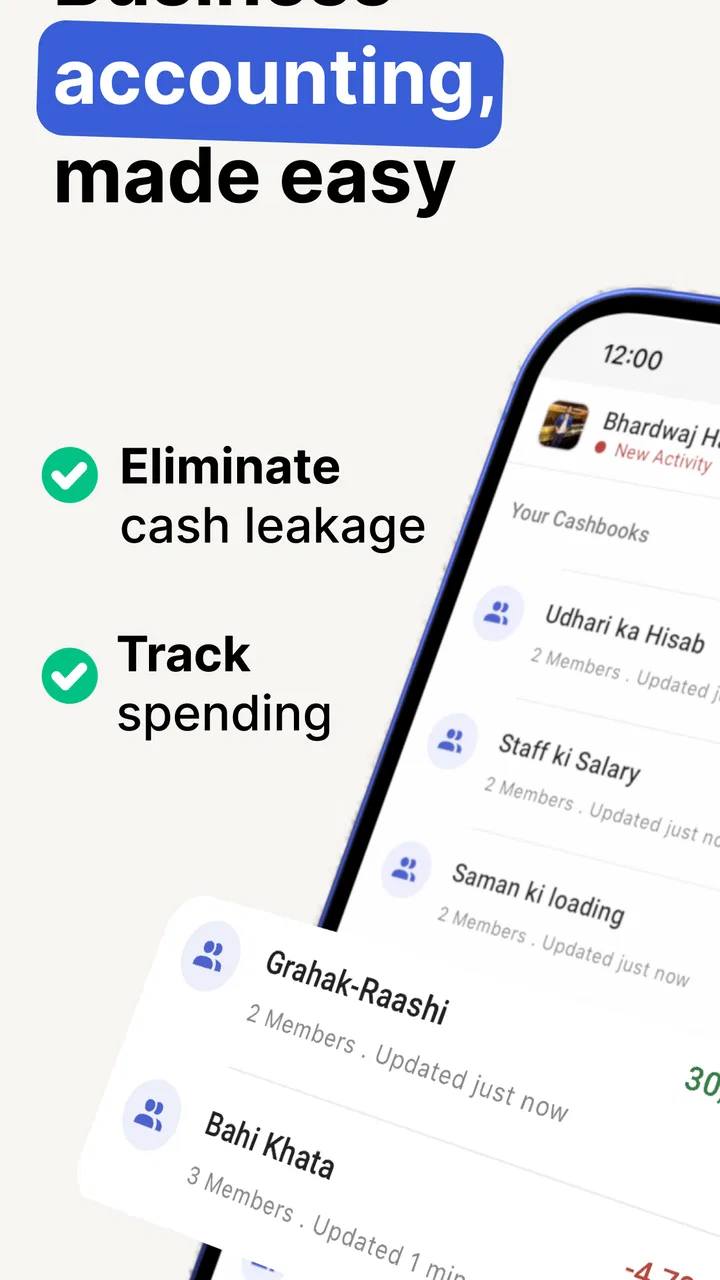
I use cash-book apps when I want a quick answer to a simple question: where did the money go today? CashBook - Balance & Expense is built around that everyday need rather than trying to become a full accounting suite. It is a business app from Obopay – Payment Wallet for Businesses, and its focus is recording cash flow, checking a daily balance, and keeping income and expenses together in one place.
That narrow purpose is its main appeal. A shop owner, freelancer, market seller, or anyone handling frequent small transactions can open the app and make a running record without reaching for a spreadsheet. I found the idea more practical than glamorous: the value comes from building a habit of entering transactions while they are still fresh, not from a long list of advanced business tools.
The app is free to install and is rated for Everyone. Its current version is 8.7.3, and it supports Android 7.0 or later. The listing shows around 3.8 as its average rating, with over 200 thousand ratings and more than 5 million installs. Those figures suggest that it has reached a broad audience, although the rating also tells me to approach it as a useful, imperfect utility rather than a flawless financial system.
You May Also Like

 Blood Strike: 2.5 Anniversary
Blood Strike’s Loadouts Turn Every Drop Into a Tactical Gamble
A close look at Blood Strike’s custom loadouts: how fast access to signature weapons reshapes its battle royale rhythm, rewards preparation, and narrows the gap between fights.

 Pandora - Music & Podcasts
Pandora’s Music Is Easy to Start, but Harder to Recover
Pandora’s strength is its low-effort path from a seed to a station. Its weak spot is how much confidence it asks you to place in connection, setup, and quiet recovery.

 8 Ball Pool
 Is Built on Rivalries, Rematches, and Routine
A close look at the rivalries, rematches, shared routines, and unanswered safety questions that turn a quick pool match into a persistent mobile community.

 Samsung Music
’s Quiet Strength Is Playing What You Already Own
Its reach comes less from spectacle than from dependable access to a personal library. That simplicity is both the app’s strongest retention engine and its ceiling.

 AccuWeather: Weather Radar
AccuWeather Review: A Quick, Clear Forecast for Everyday Decisions
For everyday plans, the best forecast is the one you can understand quickly. AccuWeather makes rain timing, radar, and local conditions easy to act on, with a few trade-offs.

 Hill Climb Racing
Why Hill Climb Racing Still Turns Crashes Into One More Run
A tiny car, a bumpy hill and one more upgrade: Hill Climb Racing keeps resurfacing because its simple chaos makes every near-miss feel personal.
More From Our News Desk



How CashBook fits into everyday money tracking
I find CashBook most useful when I treat it as a small daily routine rather than a place to sort out finances after the fact. A quick check of what was entered can help me spot whether a missing receipt or an unclear description will make the closing balance harder to trust. From there, I’d look at the simple setup checks that can prevent avoidable confusion.
A simple record for income, spending, and cash on hand
The clearest way to understand this app is as a digital cash notebook. Instead of keeping separate notes for sales, purchases, and miscellaneous spending, I can use one place to record the movement of money and then review the resulting balance. That makes it particularly suitable for businesses where cash changes hands throughout the day and a formal accounting workflow would feel unnecessarily heavy.
A realistic example would be a small food stall. In the morning, I might begin with cash available for change. During the day, I record sales as income and ingredients, transport, or packaging as expenses. At closing time, the balance gives me a more useful picture than memory alone. If the amount looks wrong, I have a list of entries to inspect instead of trying to reconstruct the whole day from scattered receipts.
The important discipline is timing. I would not wait until the end of the week and expect the app to repair incomplete records. CashBook can organize what I enter, but it cannot know about a sale or expense that I forgot to record. For that reason, its strongest users are people willing to make short entries immediately after a transaction.
Why a cash book can be better than a spreadsheet
A spreadsheet remains more flexible. I can create custom columns, add formulas, build reports, and share the file with an accountant. However, that flexibility also creates work. A blank sheet requires decisions about structure, categories, formulas, and formatting before it becomes useful. CashBook is more approachable when the goal is simply to log money in and money out without designing a bookkeeping system first.
It also has an advantage over a paper notebook: entries are easier to review as a running financial record, and a digital balance is less dependent on mental arithmetic. That does not make it a replacement for proper accounts. If I need tax preparation, inventory valuation, payroll, invoices, bank reconciliation, or multi-user controls, I would look at dedicated accounting software instead.
The trade-off is that a focused cash book may feel limiting once a business grows. A very small operation can benefit from simplicity, while a larger operation may quickly need structured records that go beyond daily cash movement. The right choice depends less on the number of transactions than on how much financial detail the business must preserve.
What the free access means in practice
CashBook is listed as free, so I can start using the basic app without paying an upfront purchase price. That matters for a new seller or a person testing a bookkeeping routine: there is little financial commitment in trying it before deciding whether the workflow suits the business.
The listing also shows in-app purchases ranging from a few dollars to several hundred dollars per item. Because those purchase options cover a wide range, I would not assume that every useful function is included in the free experience, nor would I assume that a premium option is necessary for ordinary daily recording. I would check the purchase screen carefully before confirming anything and judge the upgrade by a specific need rather than by the promise of “more” features.
This is an important distinction when evaluating value. The free entry point is clear, but the value of paid options depends on what a particular user needs and on the exact option selected. Someone who only wants a basic daily log may find the free access sufficient. A business considering a costly purchase should first test the routine with real transactions and confirm that the added capability solves a problem it actually has.
Small workflows that make the app more useful
One practical method is to record transactions in batches only when a receipt or sales slip gives enough detail to avoid guessing. For example, if I make several purchases from the same supplier, I can enter each one separately when the amounts or purposes differ. Combining unrelated expenses into one vague entry may make the balance correct while making later checking almost impossible.
A second useful habit is to treat the daily balance as a checkpoint, not as proof that every record is accurate. At closing, I would compare the app’s result with the cash physically available and investigate a mismatch while the day’s activity is still memorable. This turns the app into a lightweight control routine rather than just an archive of numbers.
A third insight is to separate business money from personal spending as much as the app’s workflow allows. Even a well-maintained cash book becomes confusing if household purchases and business expenses are mixed together. If I take money from the business for personal use, I would record it consistently under the closest available description instead of hiding it among ordinary operating costs.
These habits are not flashy features, but they determine whether the app produces information I can trust. A simple tool used consistently is more valuable than a sophisticated accounting package filled with incomplete entries.
Where the app may create friction
The same simplicity that helps a beginner can frustrate an experienced bookkeeper. People who expect detailed categories, formal reports, automatic bank imports, or a full audit trail may find a cash-focused workflow too narrow. I would also be cautious about relying on it as the only record for a business with legal, tax, or compliance obligations. A daily balance is useful, but it is not automatically the same thing as complete accounting documentation.
There is also a human limitation: the app cannot eliminate the need for careful data entry. A wrong amount, duplicated transaction, or forgotten expense can produce a neat-looking balance that is still misleading. I would therefore keep important receipts and supporting documents, especially when a transaction may later need explanation.
The average rating of around 3.8 reflects that this is not a universally smooth experience. Ratings alone do not tell me which issue affects a particular device or workflow, but they are a reminder to test the app with a modest set of real entries before moving an entire business record into it. The broad install base shows that many people find the concept useful; it does not guarantee that every user will like the interface or available tools.
Who is most likely to get good value?
I would recommend trying CashBook first if I ran a small cash-heavy business and wanted a straightforward way to monitor daily income and expenses. It is also a sensible starting point for a freelancer who needs a basic view of money received and spending made for work, provided that the records are later supplemented when more formal reporting is required.
It can be helpful for a family member managing a small shop, a side business, or informal sales activity where the main question is whether the cash position is improving or shrinking. The low initial cost makes experimentation easy, and the Everyone age rating keeps the app broadly accessible for ordinary household or business use.
I would be less enthusiastic for a company with several people entering transactions, complex customer accounts, stock management, recurring billing, or a requirement for accountant-ready reports. In those cases, dedicated accounting software or a carefully designed spreadsheet may offer better control, even if it takes longer to learn. I would also skip it as a sole solution if I needed automatic connections to financial institutions or a comprehensive record of non-cash business activity.
How it compares with common alternatives
Compared with a paper notebook, CashBook offers a more convenient way to review entries and follow a running balance, but paper still wins for instant access without a device and for users who prefer a completely manual record. Compared with a spreadsheet, the app is easier to begin with and less intimidating, while the spreadsheet remains stronger for customization, formulas, analysis, and exporting information into other workflows.
Compared with full accounting software, CashBook is more focused and likely easier to maintain for a very small operation. The larger systems are better when I need invoices, taxes, inventory, customer balances, bank reconciliation, or collaboration. Their extra power comes with extra setup and often a more complicated pricing decision, so paying for them only makes sense when those capabilities solve a real business problem.
That comparison clarifies the app’s value: it is not competing on depth. It is competing on the convenience of having a dedicated place for daily cash records. If that is exactly the gap in my current routine, the focused design is an advantage. If my needs already resemble accounting rather than cash tracking, the same focus becomes a limitation.
Questions I would answer before relying on it
Can I use it without paying? Yes, it is offered as a free app, which makes it reasonable to install and test. I would still review any in-app purchase prompt carefully because paid items are listed, and their prices range from $2.49 to $549.99 per item. I would not pay simply to feel that I am using the app “properly”; I would pay only if a clearly identified function justifies the cost.
Is it suitable for personal use as well as business use? It can make sense for personal cash tracking when I want a simple income-and-expense record, but its business orientation is most apparent in the way the app is positioned. For a household budget requiring detailed goals, shared planning, or long-term financial analysis, a dedicated personal finance tool may be a better match.
Can it replace an accountant or formal bookkeeping system? I would not treat it that way. It can support daily recording and help expose cash-flow patterns, but professional reporting may require records and controls outside a basic cash book. I would use it as an operational aid, not as an automatic guarantee that my accounts meet every business or tax requirement.
Will it work on an older Android phone? The listed minimum is Android 7.0, so devices running that version or newer meet the stated operating-system requirement. Before committing important records, I would still test the current version on the actual phone I plan to use and establish a backup routine for any financial information I cannot afford to lose.
Is the app appropriate for a large team? I would be cautious. A single owner or a very small operation can keep responsibility clear, but multiple people entering money creates questions about consistency, corrections, and oversight. If the business needs detailed user permissions or a formal approval process, I would choose a system designed for that purpose rather than stretching a simple cash book beyond its natural role.
My buying decision and final recommendation
My verdict is to try CashBook when the problem is basic daily cash visibility and the cost of experimenting needs to stay low. The free installation gives a small business a practical way to test whether regular digital entries are easier than paper notes or a spreadsheet. I would begin with a limited period, record every transaction consistently, compare the closing balance with the real cash, and see whether the resulting history helps me make decisions.
I would not recommend buying an expensive in-app option in advance. The listed purchase range is broad, and paid value should be judged against a specific need, not against the assumption that the most expensive choice is the most suitable one. If the free workflow handles income, expenses, and daily balance well enough, that may be all I need. If it does not provide the depth required for my business, spending more inside the same narrow system may be less sensible than moving to proper accounting software.
Overall, I see CashBook - Balance & Expense as a practical first step for people who need order more than complexity. Its best quality is that it encourages a clear daily habit: record the money, check the balance, and notice problems early. Its main weakness is equally clear: a simple cash record cannot answer every accounting question. I would recommend it to a small operator who understands that boundary, while advising larger or more regulated businesses to treat it only as a supplementary tool.
For the right user, that is still meaningful value. I do not need a full financial platform to know whether today’s cash movement makes sense. I need a record I will actually maintain. CashBook is worth trying when it can fill that specific gap, but I would skip it when the business has already outgrown the idea of a basic cash book.
FAQs for CashBook - Balance & Expense
01What is CashBook - Balance & Expense used for?
CashBook - Balance & Expense is a personal finance app designed to help you record income, expenses, transfers, and day-to-day cash movements in one place. After reviewing its workflow, its main value is simplicity: you can quickly add transactions, organize them by categories, and check whether your spending matches your available balance. It is useful for household budgets, personal spending, and small cash-based money tracking.
02Does CashBook - Balance & Expense require a bank connection?
No, the app is primarily intended for manual financial tracking, so you can enter transactions yourself without connecting a bank account. This makes setup straightforward and can be preferable for users who do not want to share banking credentials with a budgeting service. However, manual entry also means that accuracy depends on consistently recording every purchase, payment, deposit, and transfer as it happens.
03Can I use CashBook - Balance & Expense to manage multiple accounts or wallets?
CashBook - Balance & Expense can be useful when you want to separate money held in different places, such as cash, a bank account, a wallet, or another personal fund, depending on the options available in your installed version. Separating accounts helps prevent an unclear combined balance and makes it easier to understand where money is being spent. You should review the account and transfer features before relying on it for complex finances.
04Does CashBook - Balance & Expense provide reports or spending analysis?
The app is built around transaction records and balance monitoring, and it may provide summaries or visual overviews that help identify spending patterns. Categories are particularly useful because they turn a simple list of payments into more meaningful information about food, transport, bills, entertainment, and other expenses. Users looking for advanced investment analysis, tax preparation, or professional accounting tools should consider it a basic budgeting companion rather than a full finance platform.
05Is CashBook - Balance & Expense safe for storing financial information?
Before entering sensitive financial details, you should review the app’s current privacy policy, permissions, backup options, and any available security features in the store listing and settings. Because the app can contain personal spending records, use a device screen lock and avoid recording unnecessary information such as complete card numbers or banking passwords. Manual tracking can reduce account-linking concerns, but it does not remove the need to protect your phone and backups.
Pros
- Quickly records income and expenses with minimal effort.
- Clear balance overview helps track available money at a glance.
- Supports multiple accounts for separating personal and business finances.
- Useful category system makes spending patterns easier to identify.
- Lightweight design runs smoothly on most Android devices.
Cons
- Some advanced features may require a paid upgrade.
- Manual entry can become tedious for users with many daily transactions.
- Limited bank integration may require extra effort to import transactions.
- Reports may not be detailed enough for complex budgeting needs.
- Backup and synchronization options may depend on account settings or subscription.

CashBook - Balance & Expense
Gallery